
ICML 2026 Getting Started
Overview
Everyone is expected to follow the Code of Conduct. We recommend you start with the conference schedule, and read below to learn more about how to use all elements of the virtual conference site. Thank you to all the organizers who made ICML 2026 possible.
Badges/Checkin
- Registration can be accessed by the East Gate in the Hall B Foyer, here is the schedule.
- If you have a workshop only badge you will be able to pick up your badge starting at 3pm Thursday
- Minors Policy - See here.
- Treat your badge like cash and wear it every day. The reprint fee is full price. Details
- Do not allow anyone to use your badge. Details
Mobile App
Download the ICML official mobile app.
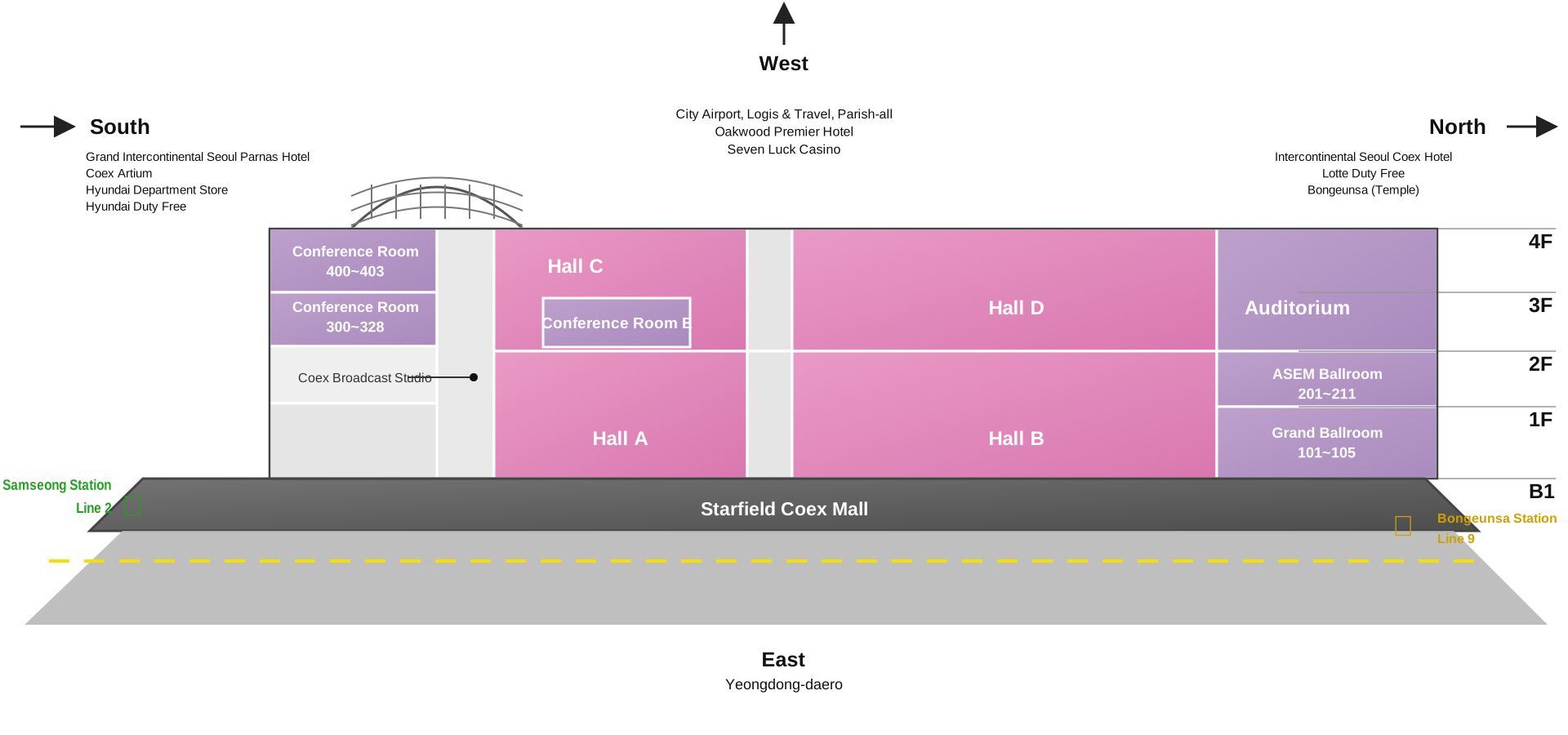
COEX Floor Map
Timezones
Your current timezone: . (Note: the paper browser uses your computer's system timezone.)
You can have the conference display the time in your timezone (mostly useful for virtual attendees). We highly recommend picking a timezone based on a nearby city, especially if your area observes daylight savings time. Timezones are political and complex and thus confusing. Please check your timezone, and preferably choose a zone based on a city. The conference is in the Asia/Seoul timezone.
In previous conferences some attendees have noticed that the times shown on the virtual website appeared incorrect. The problem was that they chose a timezone that did not adjust for daylight savings time.
Scholar Inbox
ICML is partnering with scholar-inbox.com to provide all attendees personalized conference programs based on personal research interests to more easily navigate the conference sessions. scholar-inbox.com is a community-driven paper recommender system developed by researchers for researchers. The personalized programs can be accessed from any mobile device or PC via web browser.
Exhibitors
We encourage everyone to view the Sponsoring exhibitors. Hover over the sponsor logo for company information.
Exhibitor Sponsor Hall (Hall B1)
- Tuesday July 7th from 11:00 am - 7:00 pm
- Wednesday July 8th from 9:00 am - 6:00 pm
- Thursday July 9th from 9:00 am - 6:00 pm
Poster Pickup
- If you ordered your poster through The Fosters Poster Printing Company:
- Authors can pick up their poster with their confirmation email at the poster pick up area near Hall B2 (East Gate) at COEX.
- Poster pick up hours are as follows:
- Tuesday, July 7, 9:00 - 18:00
- Wednesday, July 8th, 9:00 - 18:00
- Thursday, July 9th, 9:00 - 18:00
- Friday, July 10th, 7:30 - 12:30
- Saturday, July 11th, 7:30 - 7:30 - 12:30
Posters Sessions
- Do not hang posters on any of the walls inside COEX, this includes workshop rooms.
- All poster sessions will be held in Hall A
Lost and Found
All lost and found will be kept at help desk in the Hall B Foyer. Items will be locked up in staff office when registration closes. COEX will take any lost items remaining after the conference ends.
Luggage & Coat Check
-
2nd Floor inside the Plaetz
- Monday, July 6th: 7:30 am - 7:30 pm
- Tuesday, July 7th: 8:00 am - 7:30 pm
- Wednesday, July 8th: 8:00 am - 7:30 pm
- Thursday, July 9th: 8:00 am - 7:30 pm
- Friday July, 10th: 7:30 am - 5:30 pm
- Saturday, July 11th: 7:30 am - 5:30 pm
Food and Beverage
Daily AM/PM Break & Retail Lunch Schedule
- ICML will not be providing box lunches. All attendees are responsible for their own purchase of lunch. There is a mall inside COEX & numerous restaurants nearby.
- Substantial am/pm breaks will include food, coffee, tea.
Virtual Site System Requirements
JavaScript must be enabled in your browser. A minimum of 10 mb of inbound bandwidth is recommended. A Chromium based browser is recommended.
Navigating the Website
You may access all parts of the conference content using the menu bar near the top of this page. Check the Schedule to get an overview of when the live sessions are taking place. You may navigate all the papers in the Papers section. You may search for titles and authors or look through all papers by skimming titles and bookmarking them. You can bookmark other sessions as well. If you go to your name in the top right corner and click on My Bookmarks in the dropdown menu, you can Download the schedule with all sessions you bookmarked and you can import (subscribe to) it in your calendar.
Chat
Chat channels are embedded on events. The Chat Directory includes all channels and your chat settings. Website and mobile use the same chat.
Video
- Affinity Workshops, Workshops, Test of Time Award, Invited Talks, Orals, and Tutorials will have a live stream on the page that you can watch during and after the presentation. Expo talks, expo demonstrations, and expo workshops will not stream nor be recorded.
- Finished videos will be available after the conference.
Live Captioning
We will be using automatic live captioning during the talks to help improve accessibility. We recognize that live captioning is beneficial not only for those who are hard of hearing but also for those for whom English is not their native language. That said, we also recognize that these systems are not perfect, and errors occur more often not only for technical terms but also for those whose accents and intonations do not fit the training data. If you share specific bugs with the D&I Chairs we will share with our provider. We're also always open to constructive feedback on how we can make presentations more accessible and inclusive.
Technical Support
If you need technical support use this form
If you personally feel concerned or observe someone else have inclusion difficulties, please reach the ICML hotline at conference.liaison@icml.cc