
Learning GUI Grounding with Spatial Reasoning from Visual Feedback
Abstract
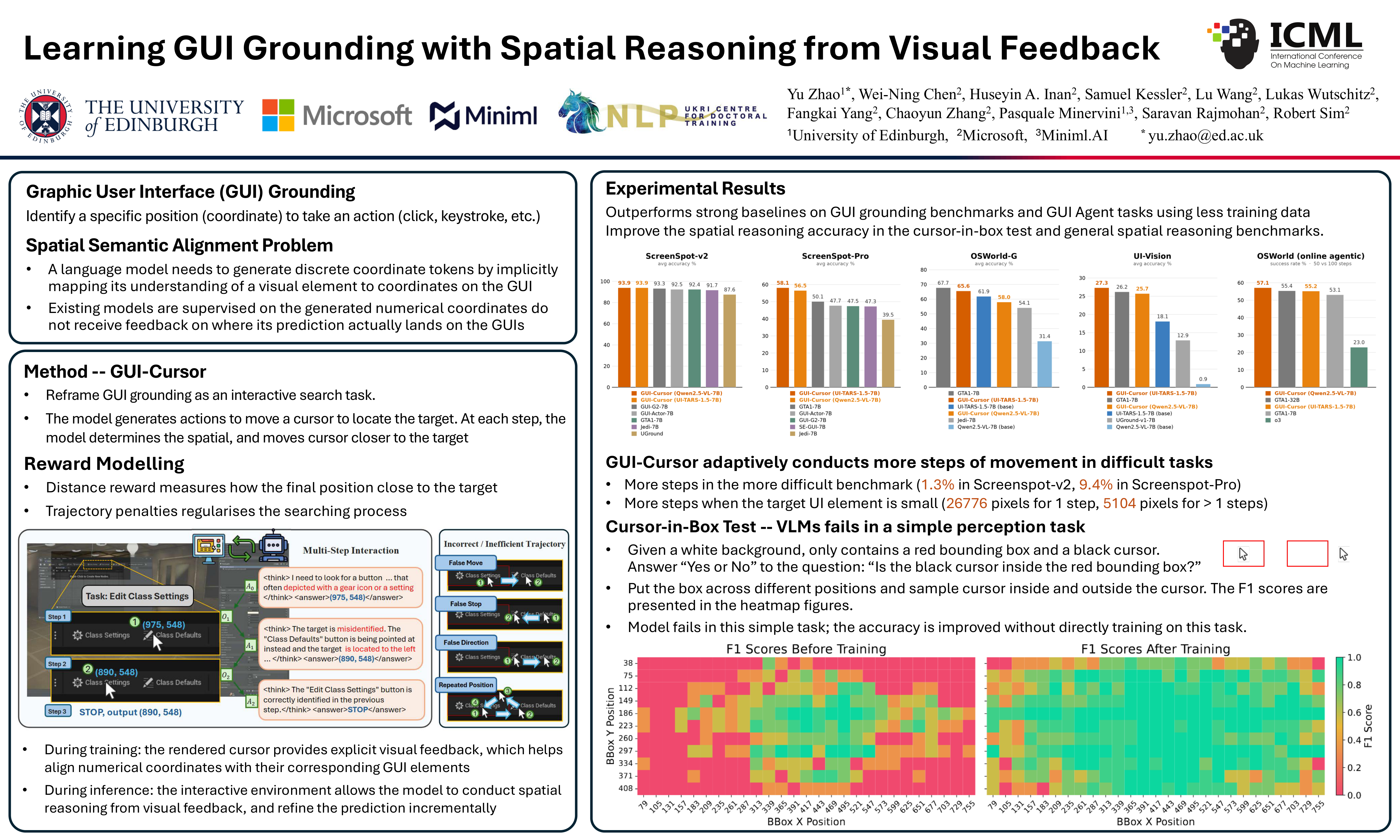
Graphical User Interface (GUI) grounding is commonly framed as a coordinate prediction task – given a natural language instruction, generate on-screen coordinates for actions such as clicks and keystrokes. However, recent Vision Language Models (VLMs) often fail to predict accurate numeric coordinates when processing GUI images with high resolutions and complex layouts. To address this issue, we reframe GUI grounding as an interactive search task, where the VLM generates actions to move a cursor in the GUI to locate UI elements. At each step, the model determines the target object, evaluates the spatial relations between the cursor and the target, and moves the cursor closer to the target conditioned on the movement history. In this interactive process, the rendered cursor provides visual feedback to help the model align its predictions with the corresponding on-screen locations. We train our GUI grounding model, GUI-Cursor, using multi-step online reinforcement learning with a dense trajectory-based reward function. Experimental results demonstrate that GUI-Cursor surpasses strong baselines in GUI grounding and agentic tasks, achieving superior performance with the same base models while requiring less training data. Further analysis shows that GUI-Cursor learns to adaptively conduct more steps on more difficult examples, and it obtains better spatial reasoning capability on out-of-distribution domains.
Lay Summary
Imagine asking an AI assistant to book a flight, fill out a form, or edit a spreadsheet for you. To do that, the assistant has to look at the screen and click the right button -- but today's AI is surprisingly bad at this. The reason is odd: it is asked to type out the pixel coordinates of its target from one glance, without ever seeing where its click would actually land. It's like throwing darts in the dark. This paper introduces a more human approach: the AI moves a cursor on the screen, looks where it ended up, and adjusts. After a few small moves, it can tell it's in the right spot and stops. The model is trained with rewards for reaching the target efficiently, and penalties for wandering or guessing blindly. The result, GUI-Cursor, is far more accurate than previous methods, especially on cluttered, high-resolution screens like professional design or office software. It also learns to slow down on harder targets, taking extra moves only when needed. As a side benefit, "seeing while doing" sharpened the model's general sense of spatial relationships -- suggesting a broader lesson for teaching machines about the visual world.